tbinv.com
Form Letter
Edit form letter templates for Letter report and Loss Letter. (Super user only).
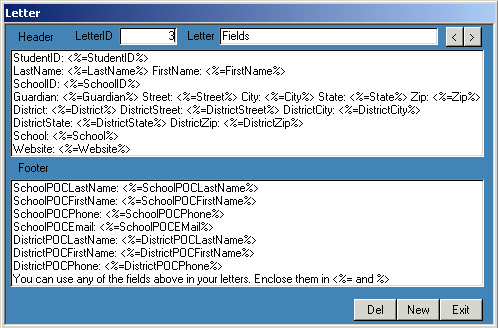 To open the form:
 Click Table, select Setup and click Edit. Click Letter.
To find a record: Click the Next or Prev buttons in the upper right of the form or press
PgDn to scroll through the records.
Click
New to create a new template. Click Del to delete a template. Enter a number for the
LetterID and a short (8 chars) description in the Letter field. Draft the letter header and footer.
Replace any variable fields with
<%=FieldName%>
where FieldName is a field name in the image above.
Here are examples of the
Loss Letter and
Responsibility Letter.
Close
Sitemap